
Order statuses
Normal progression
A successful order follows this path:Status descriptions
Processing
Your order is being fulfilled. For instant orders, this is brief. For pre-orders, this may take longer depending on your position in the queue, often a few days.Delivered (Complete)
Your order is completed. All Pokecoins have been delivered to your market ID.Delayed
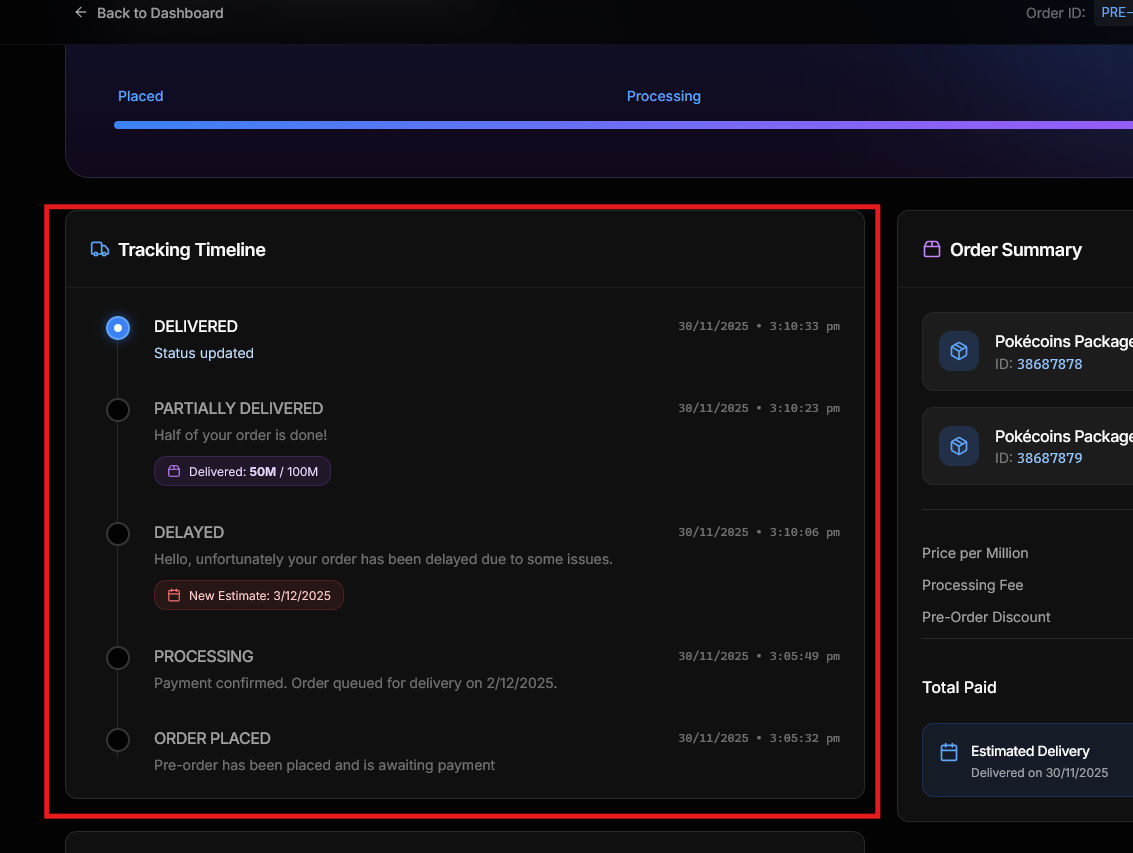
Your order delivery has been delayed. The tracking timeline shows the new expected delivery date. You will receive an email notification when an order is delayed.Partially Delivered
Part of your order has been delivered. This can happen with large pre-orders that are fulfilled in batches. The tracking timeline shows:- Amount delivered so far
- Remaining amount
Failed / Cancelled
The order could not be completed. Check the tracking timeline for the reason. Contact support if you need assistance.Tracking timeline
Each order has a tracking timeline that shows all status updates with timestamps and messages. Special updates like partial deliveries and delays include additional information:- Partial delivery: Shows amount delivered vs total
- Delay: Shows new expected delivery date
Return to View your order to learn about the order details page.