
Viewing your orders
Navigate to Orders in the sidebar to access your order list. Orders are displayed in reverse chronological order, with your most recent orders appearing first.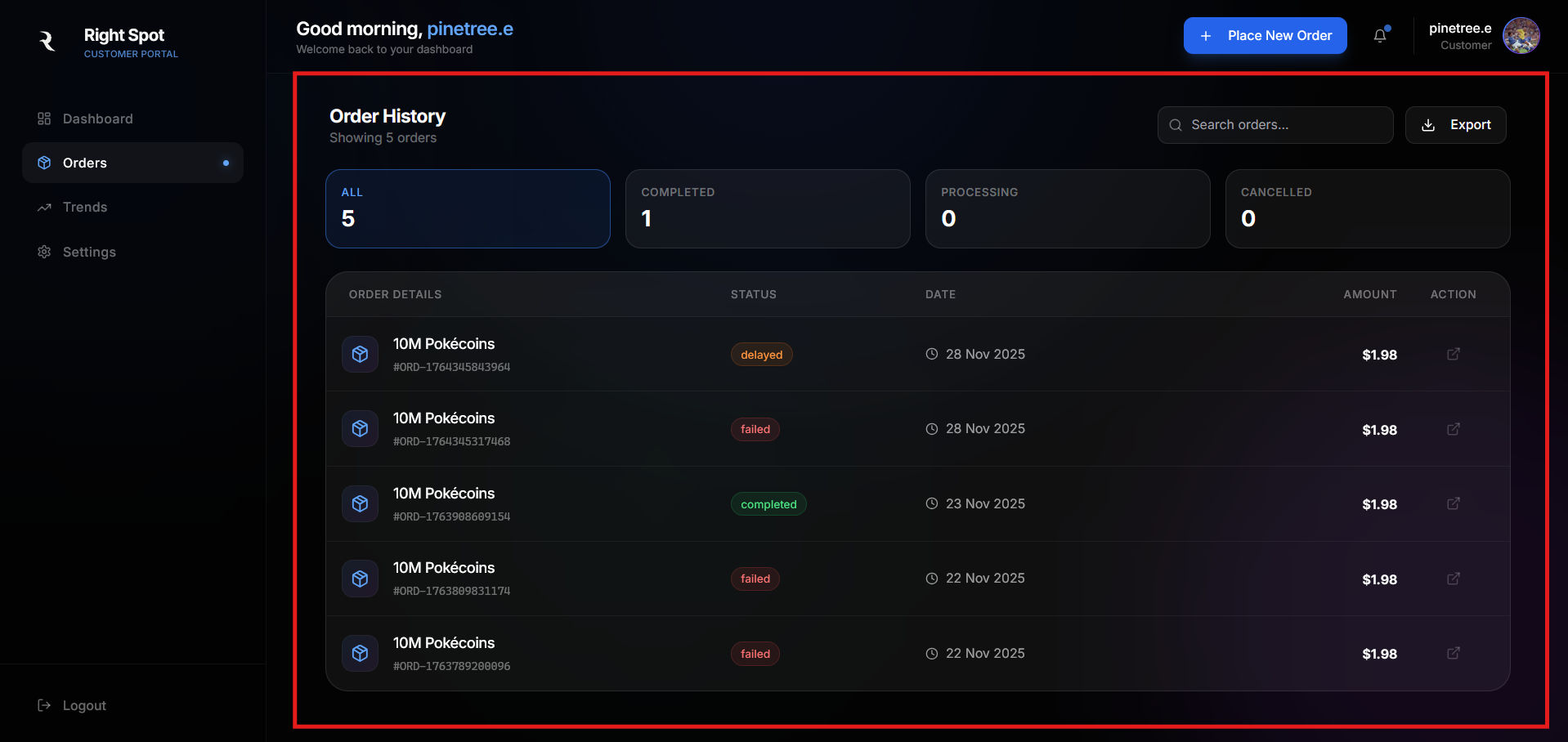
Order information
Each order entry displays the following information: Reference number: A unique identifier for the order, formatted asORD- followed by a timestamp-based code. Use this reference when contacting support about a specific order.
Pokecoin amount: The quantity of Pokecoins purchased in this order.
Total paid: The payment amount in your selected currency.
Status: The current state of the order (see tracking statuses for details).
Date: When the order was placed.
Filtering and searching
For accounts with extensive order history, the orders page includes filtering options: Status filter: View only orders with a specific status, such as delivered orders or pending payments. Date range: Filter orders within a specific time period. Search: Find orders by reference number or amount.Order details
Click any order to expand its details panel. The expanded view includes Transaction information, Delivery information, and timeline. Please refer to the View your order guide to learn more.Order status
Each order displays a status indicator showing the current stage of your order. Statuses include pending, processing, delivered, and failed. For a complete explanation of each status and what it means, see Tracking status.Exporting order history
You can export your order history for your records. Click the export option at the top of the orders list to download a csv file containing your order data.Learn about purchase analytics in Trends or understand order statuses in Tracking statuses.